Sarah Jane Williams, not sarahjanewilliams
- Nigel
- Data enrichment
- November 13, 2026
You’ve had that email. Maybe it opened with “Dear Sir or Madam.” Maybe it used only your surname. Or maybe it opened with “Dear First_name,” because somewhere along the way a merge field never merged. That’s the one that sticks.
It’s a small failure that says something big: nobody on the other end took the time to find out who you are.
We know, because we had the same problem.
When you create a No Más Rebotes account, we ask for two things: an email address and a password. Sign up with Google and we ask for nothing at all. That’s deliberate. Every extra field on a sign-up form costs sign-ups, and the research on this is consistent and unforgiving. So we’ve always kept the bar as low as we can. No first name. No surname. No company. No “how did you hear about us?”
Which leaves us with a problem the moment we want to write to you, because the greeting at the top of every email we send uses your first name.
So we did what everyone does: guess the name from the address. Our first attempt split the address on a dot or an underscore and hoped for the best. It assumed a first name followed by a surname, in that order, the English way. It had no idea what to do with an initial. The names it produced often weren’t names, and those names ended up in real greetings sent to real people.
We had become the company that writes “Hi jsmith.”
The fix wasn’t a better splitting rule. It was a different goal.
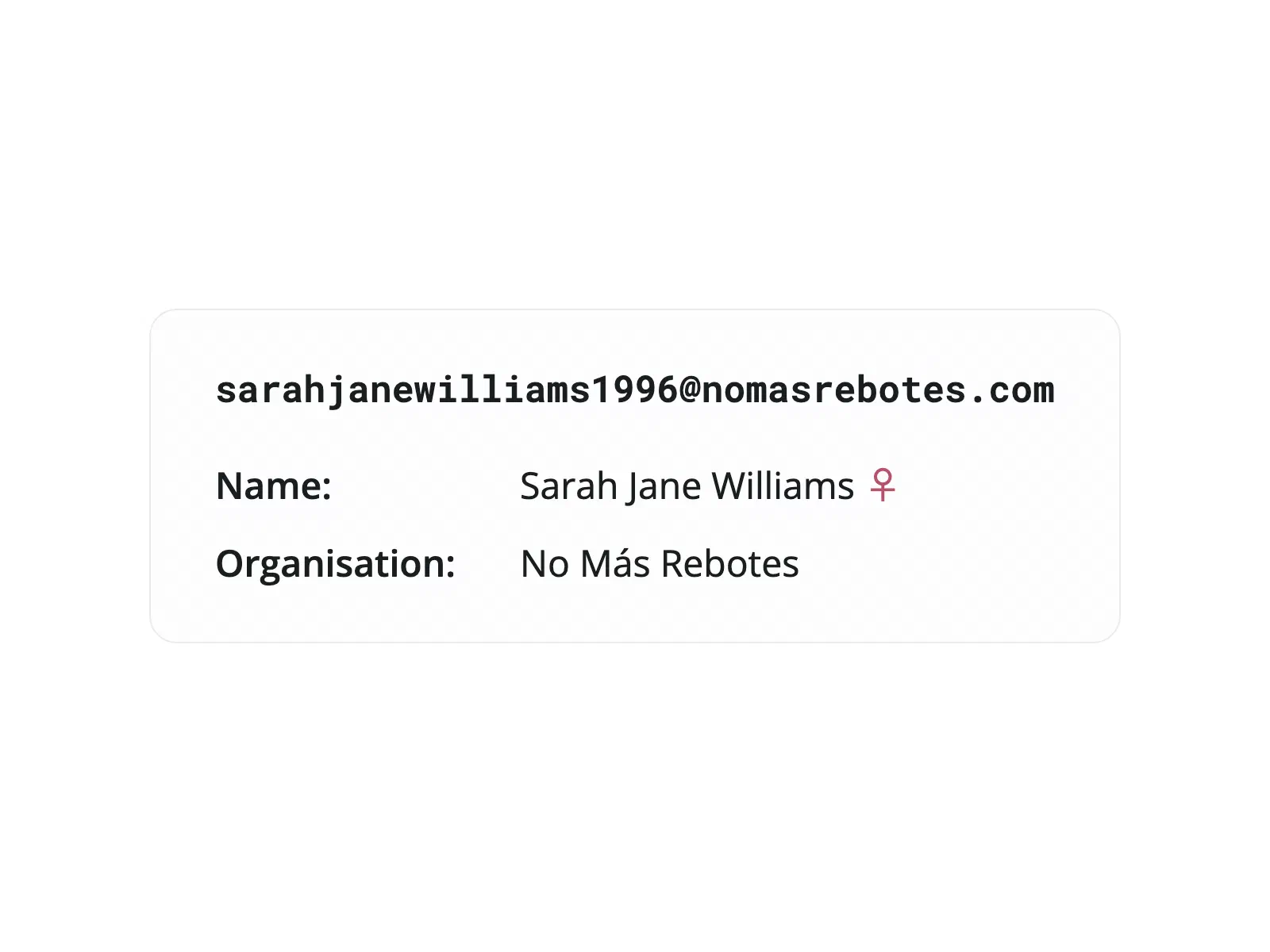
Look at sarahjanewilliams1996@… yourself. You don’t need any special knowledge to see who’s inside: Sarah Jane Williams. Two given names, one surname, a year that means nothing, and not a dot or capital letter to separate them. A person reads that address and pulls the name out without effort.
That’s what we set out to reproduce: the ordinary human ability to look at an email address and see the person in it. I think we’ve done it.
It reads English names and Spanish names alike, and it knows what it can’t see. Give it jsmith@… and it returns the surname Smith, with J kept separately as an initial rather than passed off as a first name. That’s how “Hi jsmith” never happens again.
We built it Spanish-first, and that matters more than it might seem. Tools made for English addresses expect one first name and one surname, and they don’t expect accents at all. In Spanish, two of each is normal. And accents get stripped to make an address work, so a tool that doesn’t know Spanish names can’t put them back. Ours knows which names carry an accent and where, so danielaramirez@… comes back as Daniela Ramírez, not Daniela Ramirez. It also works out which parts are given names and which are surnames, rather than assuming the order.
Being addressed by your real name, spelled the way you spell it, accents and all, says something. It’s the exact opposite of “Dear First_name.”
The new engine was working, and working far better than the naive version it replaced. The next thought was obvious: our customers have this same problem.
It became concrete when my colleague Rachel told me about a customer whose database had been built up over years, piece by piece, from different sources. The quality is uneven. Some records are complete. Others are nothing but an email address.
That customer can’t personalize a message to those contacts, can’t segment them, and can’t greet them by name when they meet in person. But in many cases the name is right there inside the email address, unread. Filling those gaps with what you already have turns a list of addresses back into a list of people.
Data enrichment is available to everyone now. When you upload a file of addresses to verify, tick Enable data enrichment.

The CSV you download then carries six extra columns next to the verification result: given_names, surnames, given_name_initials, surname_initials, organisation and gender.
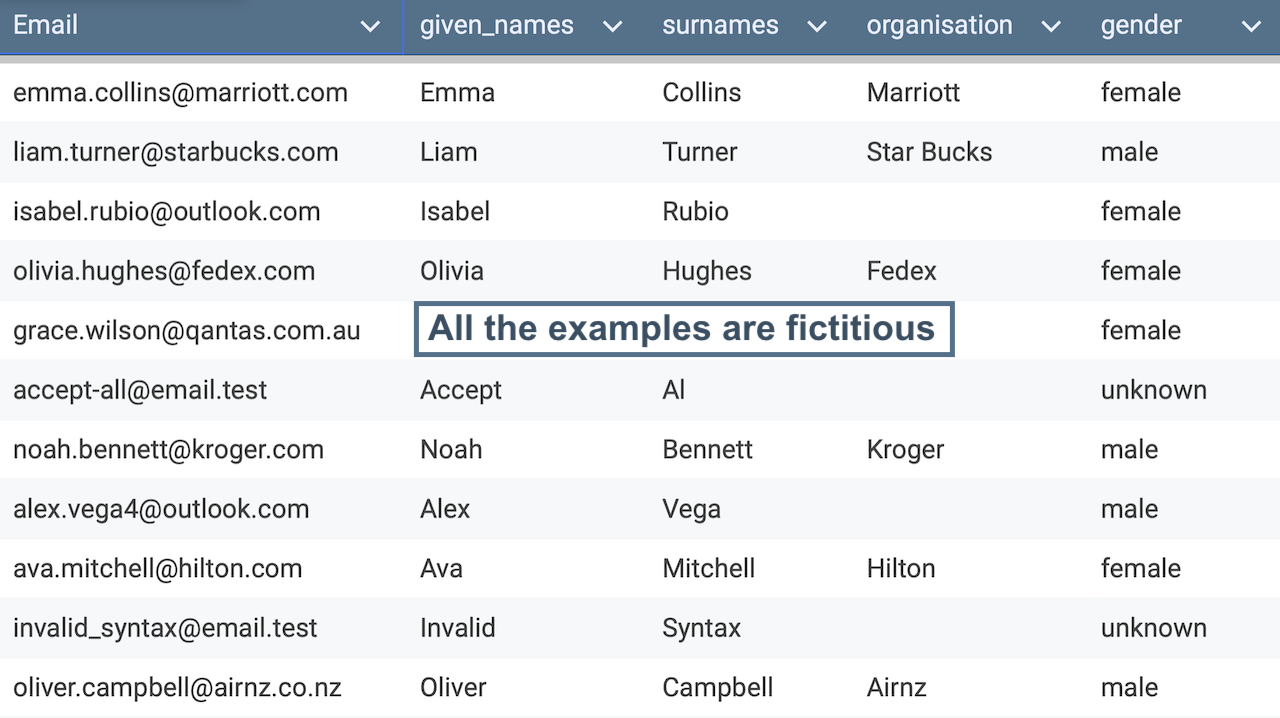
The organization name is the least flashy of the lot and still worth having: one more field your CRM was missing, filled with data you already had.
We include gender because for most names it’s rarely ambiguous. The names we recognize carry one (Sarah comes back female), and when a name is clearly Spanish, its ending is a reliable clue. It isn’t infallible, but it comes close.
You can also see it working right now, without uploading anything: type an address into the verifier on our home page and the name, gender and organization appear next to the result.
For now, data enrichment costs nothing extra.
Some addresses don’t contain a person. sales@, info@, billing@: in those cases the name fields come back empty. The same happens when an address contains nothing our engine recognizes as a name.
That’s a deliberate choice. An empty field is honest, and you can act on it. A made-up name is worse than no name, because you won’t know it’s wrong until you’ve sent it to someone.
Type an address into the verifier on our home page and see what comes back. Or tick the box the next time you upload a list, and find out how many of the names you thought you were missing you weren’t missing at all.

